Would you like to transfer or synchronize data?
You can try FREE APPLICATION from online stores:




PhoneCopy.com is a web service which is free for personal purposes (with few limitations). This tutorial will show you how to backup your data from HTC Evo 4G A9292. The whole process can be completed in few minutes.
This guideline also works for similar devices like HTC ADR 6325, HTC Aria A6366, HTC Bravo, HTC ChaCha a810e, HTC DROID Incredible 2, HTC Legend A6363, HTC Salsa c510e.
Download PhoneCopy for Android to your Android phone, which you can download free of charge. After downloading and installation, go through following steps.
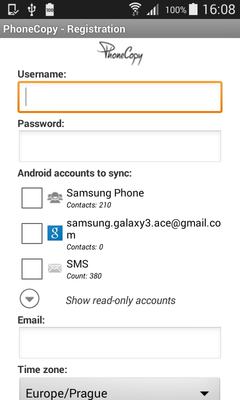
Run the app and create new account. You can check which contact databases you want to backup and synchronize. You can do multiple choice.
After successful login, press "Advanced & Account". Select "One-way sync" and after choose "This device >> server".
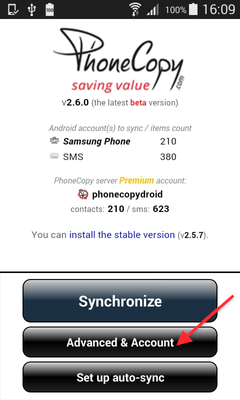
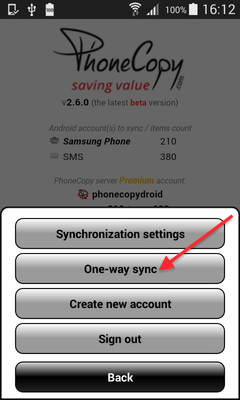
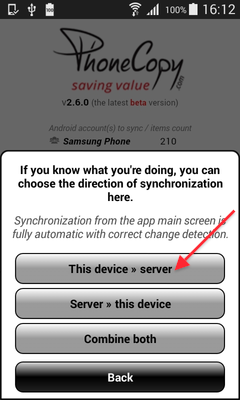
Contacts from your Android phone will be copied to PhoneCopy.com server in few seconds.
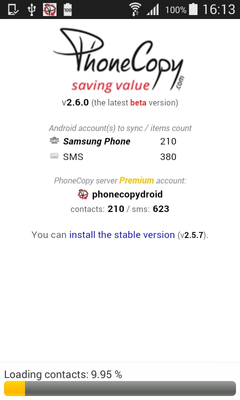
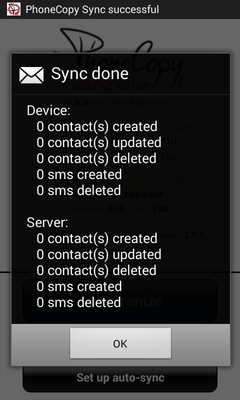
From now on, your contacts are protected. If anything happens to your HTC Evo 4G A9292, simply log into PhoneCopy to access or restore your data instantly.
If you ever get a new phone, you can restore all your contacts in minutes using PhoneCopy. The service supports a wide range of manufacturers, so switching between brands is no problem.


