Would you like to transfer or synchronize data?
You can try FREE APPLICATION from online stores:





PhoneCopy.com makes it simple to back up your contacts from Sony Ericsson Xperia Arc LT15i to the cloud. In this guide, we will walk you through the entire process step by step.
This guideline also works for similar devices like Sony Ericsson Xperia mini pro SK17a, Sony Ericsson Xperia X10, Sony Ericsson Xperia X10 mini (E10i), Sony Ericsson Xperia X10i (Rachael).
Download PhoneCopy for Android to your Android phone, which you can download free of charge. After downloading and installation, go through following steps.
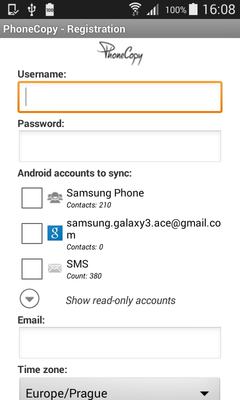
Run the app and create new account. You can check which contact databases you want to backup and synchronize. You can do multiple choice.
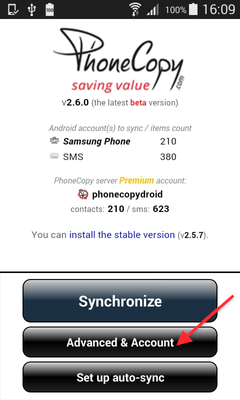
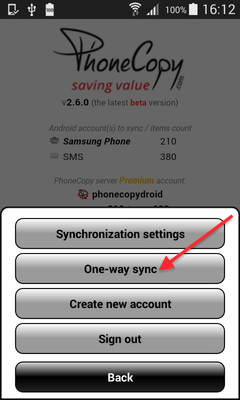
After successful login, press "Advanced & Account". Select "One-way sync" and after choose "This device >> server".
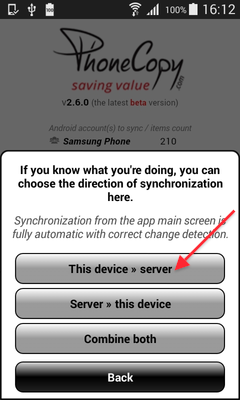
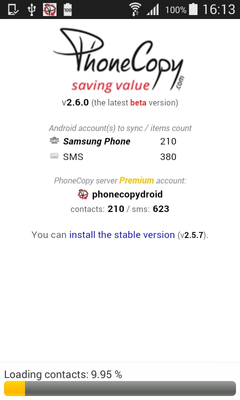
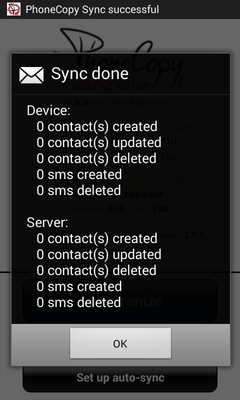
Contacts from your Android phone will be copied to PhoneCopy.com server in few seconds.
This guideline also works for similar devices like Nokia 2720 Flip, Nokia 6300 4G, Nokia 800 Though, Nokia 8000 4G.
Your backup is now complete. Visit the PhoneCopy website to confirm that all your contacts were transferred correctly and to explore the other features your account offers.
You can easily remove duplicate items among your contact list or SMS messages. Just go to the Contacts (or SMS) section and choose More Actions -> Search for duplicates. Detailed wizard will help you to solve this kind of problem easily.


