
Would you like to transfer or synchronize data?
You can try FREE APPLICATION from online stores:



PhoneCopy.com supports hundreds of phone models, including Sony Xperia acro HD IS12s. This guide will show you how to use it to create a safe backup of your contacts in just a few minutes.
This guideline also works for similar devices like Sony GX LT29, Sony Tablet P (Tablet S2), Sony Xperia acro S LT26w, Sony Xperia advance ST27s, Sony Xperia GX SO-04D, Sony Xperia Ion LT28, Sony Xperia SX SO-05D.
Download PhoneCopy for Android to your Android phone, which you can download free of charge. After downloading and installation, go through following steps.
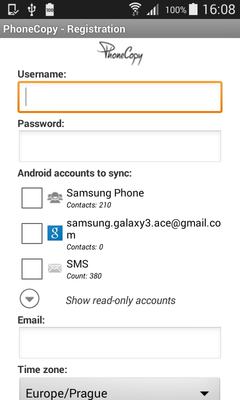
Run the app and create new account. You can check which contact databases you want to backup and synchronize. You can do multiple choice.
After successful login, press "Advanced & Account". Select "One-way sync" and after choose "This device >> server".
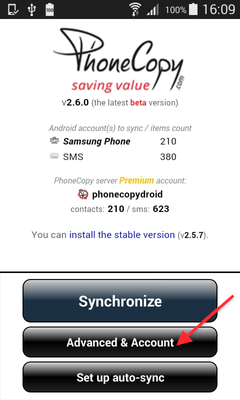
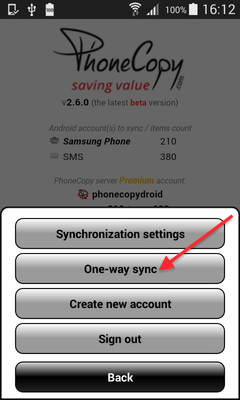
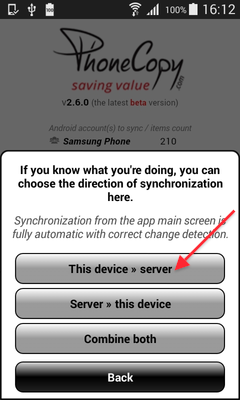
Contacts from your Android phone will be copied to PhoneCopy.com server in few seconds.
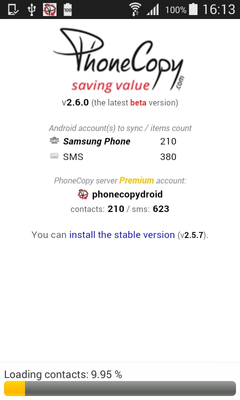
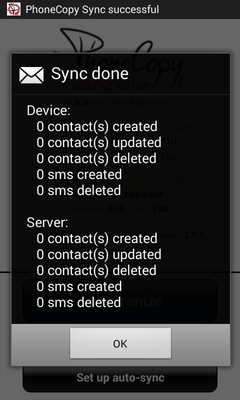
Your backup is now complete. Visit the PhoneCopy website to confirm that all your contacts were transferred correctly and to explore the other features your account offers.
PhoneCopy also supports syncing notes, calendar events, and SMS messages on many devices, not just contacts. Check the PhoneCopy website to see the full list of supported data types for your phone.


